
An ESP32 wired to an HC-SR04 ultrasonic sensor, four relay channels driving LEDs and a buzzer, and a 1.28" round GC9A01 TFT showing a stylised eye whose iris colour tracks how close the intruder is. Five zones, escalating warnings, and a flashing red eye at touching distance.
The full sketch lives at github.com/cycloarcane/prox-sense.
Hardware
- ESP32 WROOM-32 dev board
- HC-SR04 ultrasonic distance sensor — runs on 5V, outputs 5V on ECHO, so a voltage divider is mandatory on the ECHO line going into the 3.3V ESP32 input
- 4-channel active-low relay module — the relays are the whole point of the modularity here. LEDs and a buzzer are on the channels today, but each relay can switch up to 240V at 10A, so the same circuit could trip a door lock, an alarm siren, a mains-powered lamp, or any other load you'd want to fire on proximity. The ESP32 only ever sees the 3.3V coil-driver side
- Green, yellow, and red LEDs plus a buzzer, each on its own relay channel (placeholder loads — swap for whatever you actually want to switch)
- GC9A01 1.28" 240×240 round SPI TFT display
Wiring
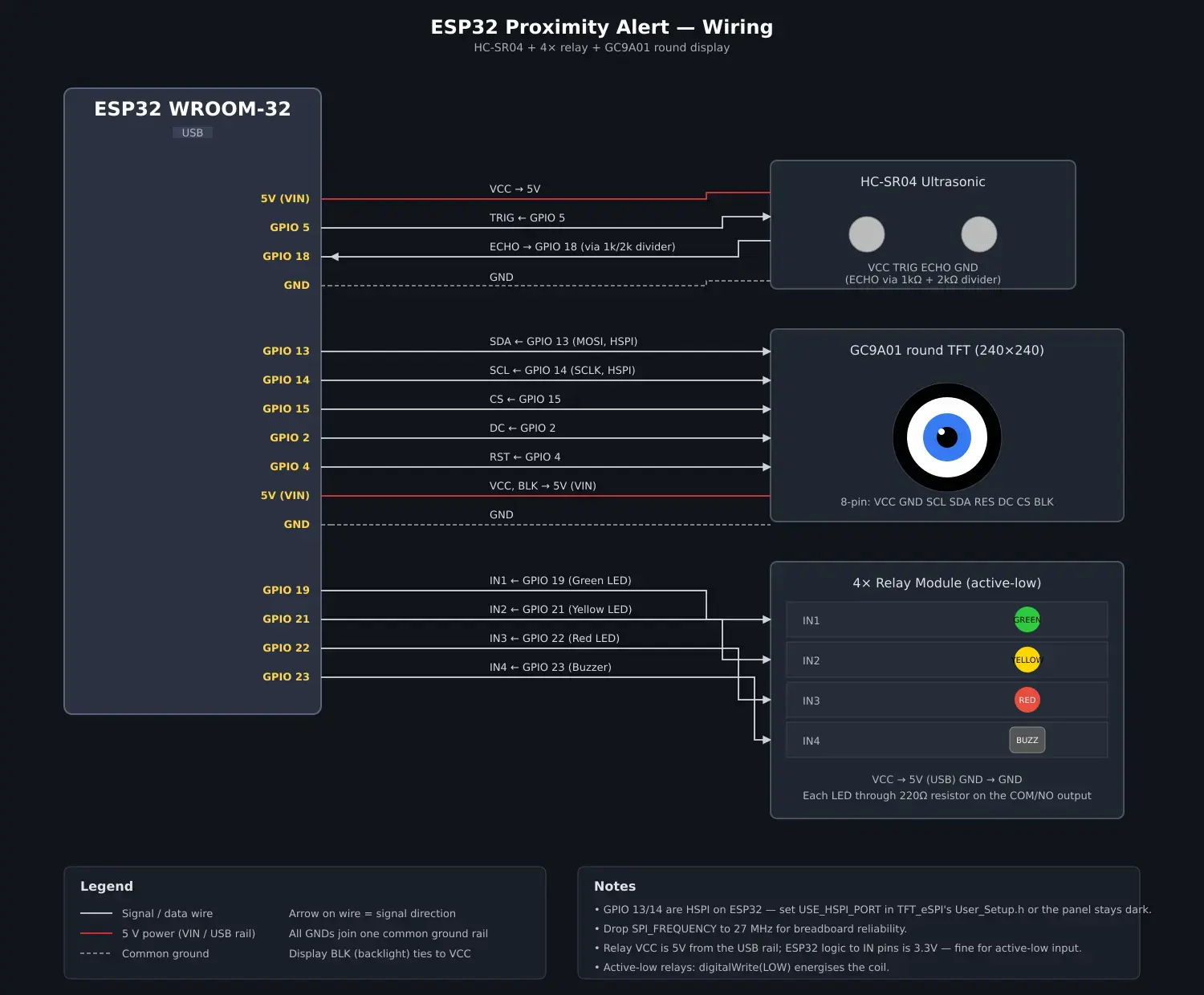
HC-SR04:
- TRIG → GPIO 5
- ECHO → GPIO 18 via voltage divider (1k to ECHO, 2k to GND, junction to GPIO 18)
Relay module (active-low — driving the pin LOW closes the relay):
- IN1 → GPIO 19 (green LED)
- IN2 → GPIO 21 (yellow LED)
- IN3 → GPIO 22 (red LED)
- IN4 → GPIO 23 (buzzer)
GC9A01 display (HSPI pins on the ESP32 — see gotchas):
- SDA / MOSI → GPIO 13
- SCL / SCLK → GPIO 14
- CS → GPIO 15
- DC → GPIO 2
- RST → GPIO 4
- VCC → 3.3V, GND → GND
- Backlight tied to 3.3V (always on)
How it behaves
The firmware loop triggers the HC-SR04, reads the echo with pulseIn, converts the pulse width to centimetres, and bins the result into one of five zones using thresholds at 50, 40, 30, and 20cm.
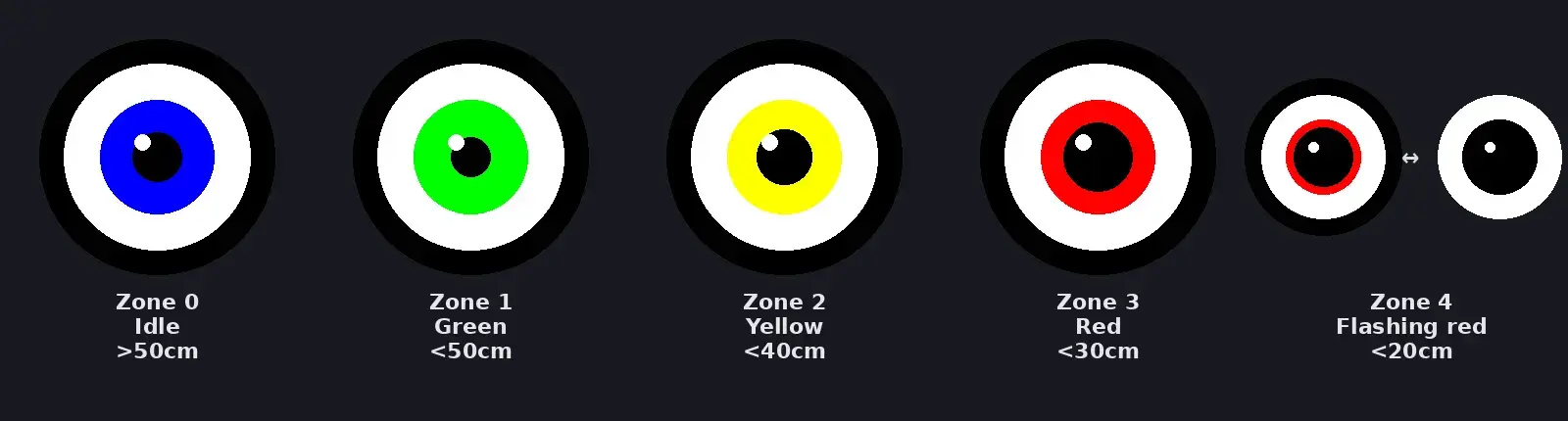
- Zone 0 (>50cm) — idle, blue iris, all relays off
- Zone 1 (≤50cm) — green LED only, green iris
- Zone 2 (≤40cm) — green + yellow LEDs, yellow iris
- Zone 3 (≤30cm) — green + yellow + red LEDs, red iris
- Zone 4 (≤20cm) — three LED relays chase green→yellow→red at 50ms each via
millis()-based timing, buzzer stays solidly on, iris flashes between red and black at 200ms intervals
The eye is only redrawn when the zone changes (the zone-4 flash is the exception). That's important for the next gotcha.
Required User_Setup.h for TFT_eSPI
The display will not work with the stock TFT_eSPI configuration. Edit ~/Arduino/libraries/TFT_eSPI/User_Setup.h so it contains at minimum:
#define GC9A01_DRIVER
#define TFT_MOSI 13
#define TFT_SCLK 14
#define TFT_CS   15
#define TFT_DC    2
#define TFT_RST   4
#define SPI_FREQUENCY 27000000
#define USE_HSPI_PORT
Each line matters. The reasons are in the gotchas below.
Gotchas
Every one of these came up during the build:
- Arduino IDE caches a copy of TFT_eSPI. Edits to
~/Arduino/libraries/TFT_eSPI/User_Setup.hare silently ignored if the IDE has already cached the library under~/.cache/arduino/sketches/*/libraries/TFT_eSPI/. Delete the cache copy after editing the setup file, otherwise you'll be debugging the wrong file. - HSPI vs VSPI. GPIO 13 and 14 are HSPI pins on the ESP32. TFT_eSPI defaults to VSPI, so the panel stays black even with everything wired correctly. Uncomment
#define USE_HSPI_PORTinUser_Setup.h. - SPI clock. 40MHz is unreliable for some GC9A01 boards over breadboard. Drop
SPI_FREQUENCYto 27MHz. - Sprite allocation silently fails.
TFT_eSprite::createSprite(240, 240)returns without error on ESP32 but doesn't actually allocate, because a 240×240×16-bit sprite is ~115KB and the ESP32's contiguous heap can't fit it. Either use directtft.fillCircle/fillRectcalls (fine here because the eye only redraws on zone change), or attach PSRAM and allocate from there. - Display rotation. The GC9A01 module's silkscreen orientation usually doesn't match
setRotation(0). The pupil shine ending up in the wrong corner is the giveaway —setRotation(2)flips 180°. - Drawing artifacts on angled lines. Stacked
drawLinecalls leave 1-pixel gaps when angled (Bresenham doesn't guarantee adjacency between parallel lines). UsefillTrianglefor thick angled bands instead. - Integer truncation in chord-drawing loops.
int dx = sqrt(...)rounds down, leaving 1-pixel rings of unfilled background where curves meet circles. Either paddxby +1 or avoid the technique entirely. - Visual design iteration. The first "angry eye" had eyelids and a brow drawn over the iris. It read as floating black bars on a coloured ball, not a face. A plain coloured eye with iris-colour-as-state was cleaner. Design the minimal version first; only add ornament when it actually reads correctly.
Repo
github.com/cycloarcane/prox-sense — single-file Arduino sketch (prox-sense.ino) plus README. Flash it, wire it up per the diagram above, and edit User_Setup.h as shown.
> End of output.