Vibe coding is great. You describe what you want, an AI agent scaffolds the project, writes the config files, sets up the environment, and pushes everything to GitHub. In ten minutes you have a working app. The problem is that somewhere in those ten minutes, your OpenAI key, your database password, or your AWS credentials very likely ended up in a commit.
AI coding assistants like Claude Code, Cursor, and Copilot are enthusiastic about `git add -A`. They want to commit everything, push quickly, and keep momentum going. They're not necessarily thinking about what's in your `.env`. And if you're in the flow of vibe coding, neither are you.
This is the most common way secrets end up in public repos right now, and the number is going up as more people build with AI agents. Here's what actually happens when it goes wrong, and what you need to do about it.
Deleting the file doesn't fix it
The first instinct is to delete the file, commit the deletion, and move on. This doesn't work. Git's entire value is that it remembers everything. A `git rm` followed by a commit removes the file from your working tree, but the original commit is still fully intact. Anyone with access to the repo can run:
git show <original-commit-hash>:path/to/secret-fileand read the original contents in full.
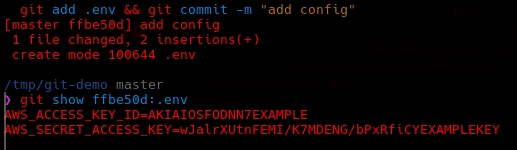
The history isn't a log that gets pruned over time, it's a permanent content-addressed store of every object ever committed. If your repo was public at the time of the push, the secret has been public since that moment, and potentially indexed or cached by automated systems before you noticed. Bots hunt for committed credentials continuously. The window between your push and the moment something crawls it is shorter than you think.
The right tool: git-filter-repo
The proper fix is to rewrite history so the sensitive file never existed in any commit. The modern recommended tool for this is git-filter-repo. Its predecessor, `git filter-branch`, is slow, error-prone, and officially deprecated. Don't use it.
You can install git-filter-repo from your system package manager on most Linux distros, or grab it as a standalone Python script. To strip specific files from every commit in history:
git-filter-repo --invert-paths \
  --path .env \
  --path certs/server.key \
  --path secrets.json \
  --force
`--invert-paths` tells it to keep everything except the listed paths. The `--force` flag is required when you're running this on your actual working repo rather than a fresh clone. One thing to watch out for: if every commit in your history only touched the file you're removing, you'll end up with an empty branch. Make sure there are other commits that survive the filter before you run it on anything you care about.
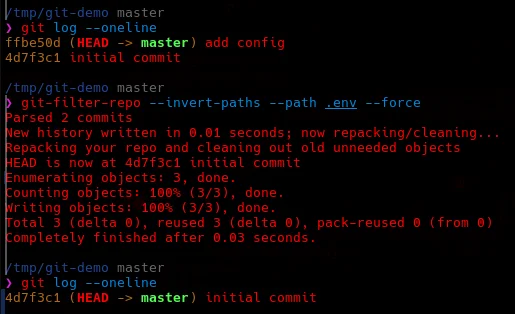
The rewrite reassigns every commit hash in the affected lineage. After a force-push, the old hashes are gone from the remote too.
Rotate the secret regardless
Rewriting history is necessary but not sufficient on its own. You also need to treat the exposed secret as fully compromised and rotate it, whether or not you think anyone actually saw it.
The reasoning is straightforward: you can't know with any certainty that no automated system picked it up between the push and the remediation. If the secret controls access to anything meaningful, assume it's been seen and act accordingly.
Rotating a secret means generating a new one, updating every system that uses it, and revoking the old value at the source. The order matters: update the consumers first, then revoke the old value, so there's no gap where nothing works.
Force-pushing rewrites the remote, not the caches
After running git-filter-repo and rotating the secret, your local repo is clean. A force-push updates the remote's branch reference to point at the new history. That said, several copies of the old objects can still be floating around.
Platform caching. GitHub retains pushed Git objects for a period after a force-push. Their documented retention is 90 days, because they can't immediately know whether those objects are still referenced by open pull requests, forks, or deployments. If someone knows the old commit hash, they can still retrieve the object directly during that window. The only way to address this properly is to contact the platform's support team and request explicit purging.
Forks. This is the most serious residual risk. If anyone forked your repo before the rewrite, their fork contains the full original history independently. A rewrite of your repo doesn't touch their fork at all. If your repo has forks you need to identify them all, notify the owners that a history rewrite has happened and they should re-clone from upstream, and if the secret is sensitive, assume every fork owner already has a copy.
Local clones. Anyone who pulled the repo before the rewrite has a local copy of the old objects. Running `git fetch` after the force-push updates their remote-tracking references but won't delete the old objects from their local store. Those persist until `git gc` or `git remote prune` is run. If you're working in a team, communicate the rewrite and ask everyone to re-clone.
What automated systems may have already seen
If the repo was public at any point while the secret was there, assume the following may have already indexed it:
- GitHub's own code search, which indexes public repos continuously
- Third-party secret scanning services like GitGuardian and TruffleHog, some of which actively notify repo owners when they find something
- Web crawlers and archive services like the Wayback Machine
- Bots specifically hunting for committed credentials, which run continuously against public repo hosts
GitHub also has push-time secret scanning for certain credential formats (AWS keys, Stripe keys, GitHub tokens, and others). If your secret matched a recognised pattern, GitHub may have already flagged it and in some cases automatically notified the issuing service before you started the cleanup.
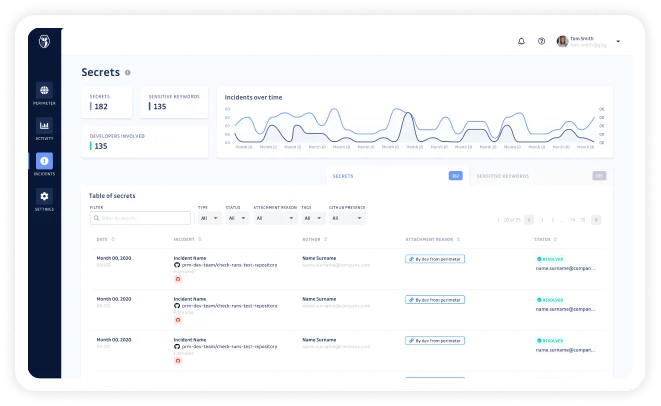
GitGuardian is worth knowing about here. It monitors public repos continuously as part of its own scanning operation, not just repos you've connected to it. If your repo was public when the secret was pushed, GitGuardian almost certainly already has a record of it regardless of whether you've ever signed up. You can connect your GitHub account and get a dashboard view of any detected secrets across your repos, which is genuinely useful for auditing projects you built in a hurry.
Tell your AI assistant about this before you start
The most effective thing you can do when vibe coding is to front-load the security context before the AI starts scaffolding. Tell it explicitly: create a `.gitignore` first, never commit `.env` files, use a `.env.example` with placeholder values instead, and don't run `git add -A`. Most AI coding tools will follow these instructions if you give them upfront. They just don't apply them by default.
Pre-commit hooks. Tools like gitleaks and detect-secrets can scan staged changes for credential-shaped strings before a commit is recorded. They're not foolproof since pattern-based detection misses novel formats, but they catch the common cases and are a good safety net for fast-moving sessions. You can wire gitleaks up as a pre-commit hook manually:
echo '#!/bin/sh
gitleaks protect --staged -v --source .' > .git/hooks/pre-commit
chmod +x .git/hooks/pre-commit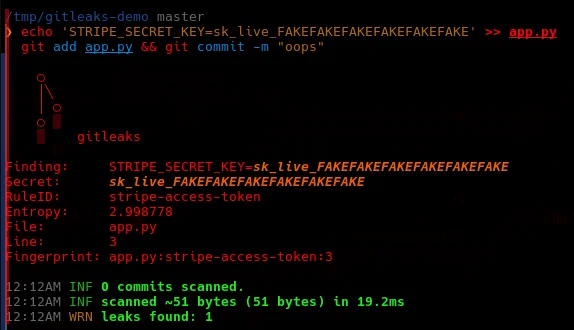
Template files instead of real files. Commit a `.env.example` containing placeholder values and a comment explaining where to get the real ones. The actual `.env` is gitignored and never tracked. Anyone cloning the repo knows exactly what they need to set up without the real values ever touching git.
Use a secrets manager. The pattern of loading a `.env` into environment variables is convenient, but it puts secrets in the filesystem right next to version-controlled files. Something like HashiCorp Vault, AWS Secrets Manager, or 1Password's developer tools keeps credentials entirely separate from the codebase and gives you rotation, audit logging, and access control as standard. If you're serious about building with AI agents regularly, this is worth the setup time.
The short version
Rotate the secret first. Then use git-filter-repo to remove the file from all commits. Force-push to the remote. Then handle the residual copies: contact the platform about cached objects if the secret is sensitive, notify fork owners if any exist, and ask teammates to re-clone.
How much any of this matters depends heavily on what the secret actually controls. A key for a home lab device is a very different situation to a production database password or a cloud provider key with billing attached. The remediation steps are the same either way, but the urgency is not.
Vibe coding is fast, which is the whole point. But the faster you're moving the easier it is to push something you shouldn't. A `.gitignore` and a pre-commit hook take about two minutes to set up and they'll save you from a cleanup that can take days.
> End of output.